- Deutsch: Diese Seite ist nicht ins Deutsche übersetzt
Release Notes
Release notes outline the changes and updates introduced in each version of the application.
2025.20
Release date: 2025.12.09
✅ New Features
- Project Creation
- When creating a new project, the initial status is now displayed as “Draft” for better clarity.
- Participant selector
- Improved sorting and added search for quicker access.
🐞 Bug Fixes
- Verify Module
- Fixed issue where thumbnails were not always loading.
- Persisting already loaded thumbnails when you scroll through the list.
- Grid Analytics Asset Mini Pop-up
- Corrected observation type display to ensure accurate information.
- Project Approval
- Incoming images are now properly removed when a project is approved.
- Asset Import
- Added trimming of white-spaces at beginning and end of Asset Identifiers and Names.
2025.19
Release date: 2025.12.05
✅ New Features & Enhancements
Grid Vision
- Now displaying full Tenant Name throughout the application for a cleaner user experience.
Global Asset Search
- Grid Analytics: Improved search functionality - users can now find assets even without the full name or ID.
🔧 Technical Improvements
- Enhanced display of long asset IDs for better readability.
- Added support for direct links to Media Viewer for faster navigation.
🐞 Bug Fixes
- Fixed incorrect styling in filter selector within the grid component.
- Corrected sorting of Projects in the Project navigation pane (now sorted by start date).
2025.18
Release date: 2025.12.02
We’re excited to share the latest updates to Grid Vision! 🚀 This release brings powerful new features and enhancements designed to make your inspection workflows smoother, your data more accessible, and your user experience even better. Dive in below to see what’s new, improved, and fixed in this update.
✅ New Features & Enhancements
- Import Data From External Sources
- See the full announcement below.
- Import Projects
- Ability to create import projects for data ingestion without inspection.
- Approve collected data for visibility in Asset Home page.
- Review PDFs and panoramic images before collecting groups.
- Media & Asset Handling
- Panoramic images now display in correct order in the Media Viewer.
- Enhanced look of Panoramic thumbnails in Project Library, Asset Compact View, and Media Gallery.
- UI/UX Enhancements
- Media Card: header actions only visible on hover.
- Support for transparent card headers.
- Added observation count for completed assets in Task Overview.⠀
Import of Historical and Future Inspection Data from Any Sources
We are excited to introduce a major enhancement to Grid Vision®: the ability to import inspection data—both historical and ongoing—from any external system directly into Grid Vision®. Whether your data comes from legacy platforms, current inspection tools, or future sources, you can now centralize all your inspection records in one powerful platform.
Unlock the Full Value of Your Inspection Data
With this new feature, you can seamlessly bring in images and observations from inspections performed before you adopted Grid Vision®, as well as data generated in parallel systems going forward. This ensures that no valuable insight is left behind, and that your organization can maintain a complete, unified view of all inspection activities.
Key Benefits:
- Comprehensive Data Integration: Import both past and future inspection data, including images and observations, from any source—legacy or current—into Grid Vision®.
- Centralized Analytics: All imported data becomes instantly available in the Grid Analytics module, enabling advanced analysis, reporting, and decision-making across your entire asset base.
- Streamlined Onboarding and Operations: The import process is guided and structured, minimizing manual effort and reducing the risk of errors or delays.
- Consistent Asset Mapping: Imported records are reliably linked to your existing assets in Grid Vision®, ensuring data integrity and traceability.
- Flexible Data Packaging: Organize inspections into projects and project groups, with clear requirements for file structure and packaging to streamline the import process.
- Technical Transparency: Access detailed guidance, including prerequisites, data structure, packaging instructions, and JSON schema examples, to ensure a smooth and successful import.
Why This Matters
By enabling the import of both historical and future inspection data from any source, Grid Vision® empowers you to:
- Preserve and leverage all inspection knowledge, regardless of its origin.
- Enable advanced analytics and reporting by consolidating all inspection data in one platform.
- Ensure regulatory compliance and audit readiness with complete, well-organized records.
- Make smarter, data-driven decisions with a holistic view of your asset health and inspection history.
Start importing your inspection data today and unlock the full potential of Grid Vision®’s analytics and asset management capabilities!
🐞 Bug Fixes
- Observation downloads: Fixed mismatch in downloading across different views.
- Verify module: Issues resolved related to image display and item visibility after completion.
- Work tasks: Corrected KPI calculations and null display issues.
- QA and Task lists in Work: Fixed scrolling issues when there are many tasks.
- Asset Home Page: Resolved layout issues for thumbnail cards.
- Inspect tool: Added support for downloading Point Clouds.
- Various fixes for KPI accuracy, Grid Analytics map failures, and custom observation schema resolution.
2025.17.1
Release date: 2025.11.13
- Improved styling and KPI´s to Asset home page
- Improved logic for Inspect when using Adaptive AI
Release 2025.17
Release date: 2025.11.10
This update brings new features, performance improvements, and important bug fixes to make the experience smoother and more reliable.
✅ New Features
-
You can now fully avoid duplicate entries when importing data.
-
The landing page will now adapt to your access level for a more personalized experience
🔧 Improvements
Behind the scenes, we’ve made important improvements to keep things running smoothly.
This includes cleaning up old settings, streamlining the code for better performance, and reorganizing parts of the system to make future updates faster and more reliable.
🐞 Bug Fixes
-
Fixed an issue where bounding boxes could be placed outside images
-
Inspect error when viewing image metadata
-
Point clouds now correctly appear in the project library
-
Point cloud can now be opened in the media viewer from Asset home page
-
Corrected styling issues on the Asset home page
2025.16.1-3
- Optimized query performance to prevent timeout issues
- Resolved issue with project group approvals
- Improvements to the Asset Home Page:
- Corrected card styling and ensured filenames display properly
- Fixed scrolling behavior
- Resolved issue with opening images for migrated data
2025.16
Release date: 2025.10.16
Unlocking the Power of LiDAR in Grid Vision
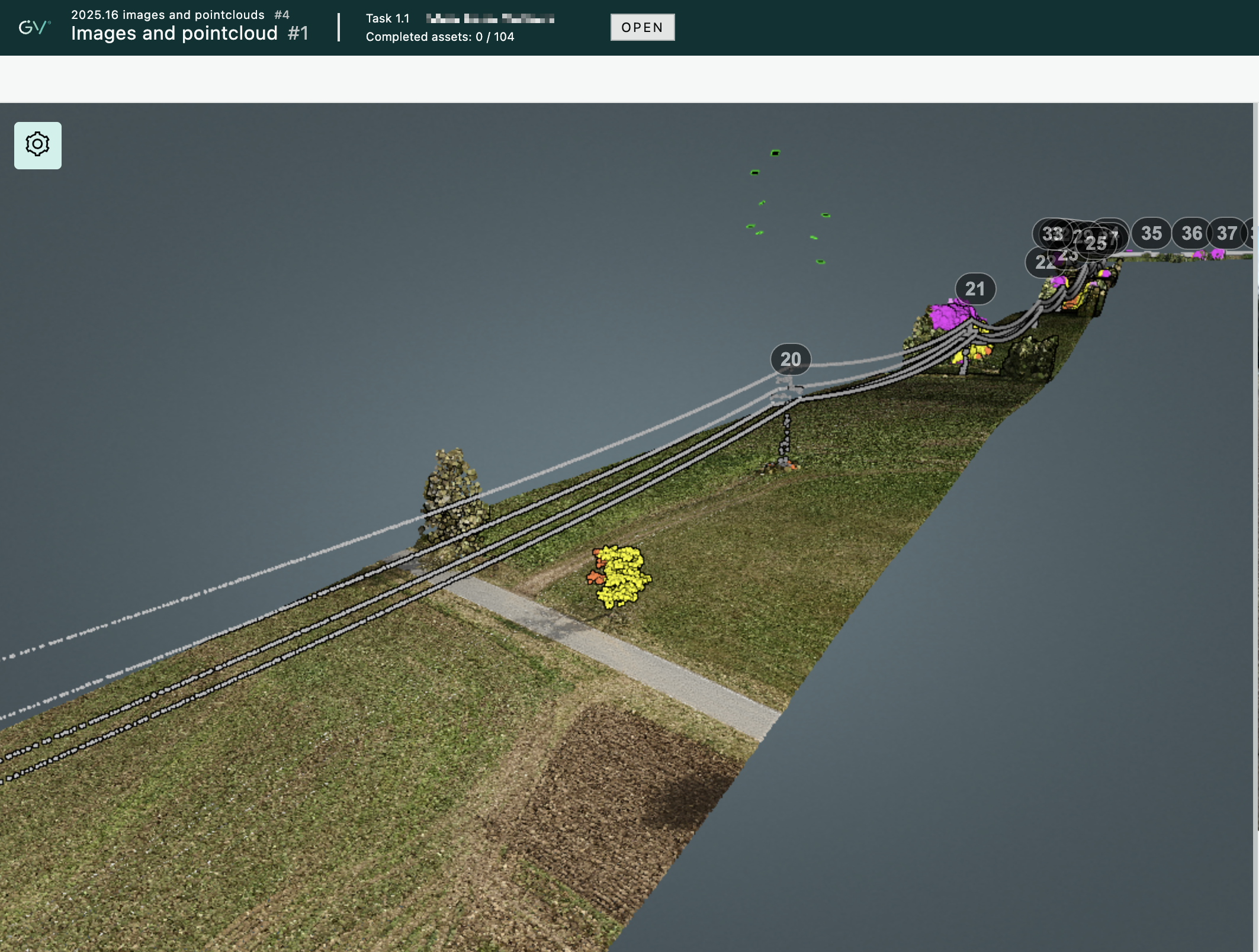
This release marks a major milestone in Grid Vision’s evolution: full end-to-end support for LiDAR data. With the introduction of point cloud capabilities in Collect and Inspect, users can now seamlessly import, manage, and review 3D data—bringing a new dimension to our customer grid’s digitalization.
Our primary focus was to make point cloud handling intuitive and efficient. Users can now import point clouds and images with ease, preview them in both map and list views, and inspect them in 3D with options to delete and collect data in multiple steps. The improved upload flow also helps avoid duplicates, saving time and reducing clutter.
But we didn’t stop there. Based on user feedback, we now supports additional media formats—panoramic images and PDFs—making it easier to incorporate diverse data sources.
This release empowers users to work with richer data, unlock deeper insights, and elevate inspection accuracy — all while keeping workflows simple and user-friendly.
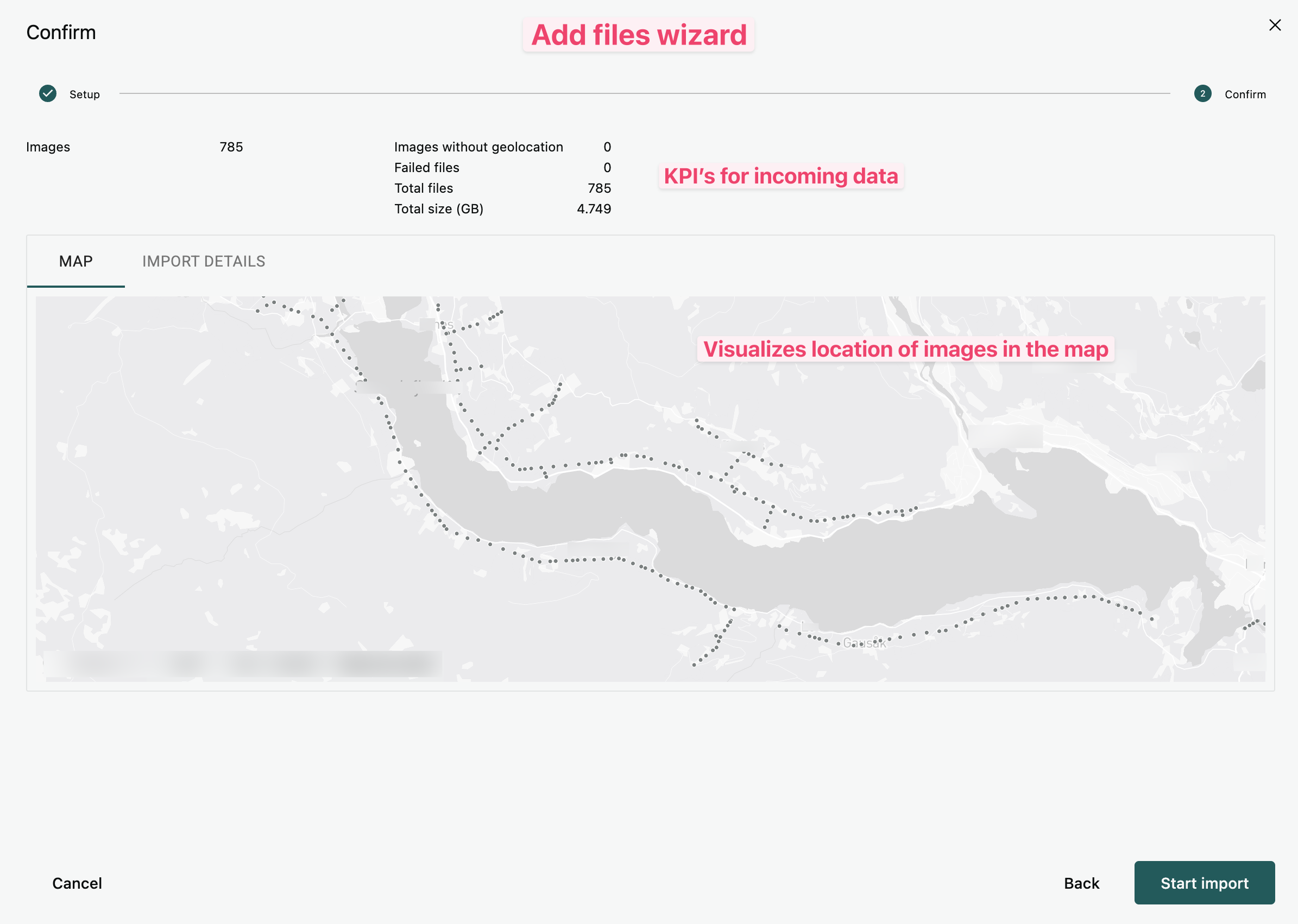
Rewamp of file upload
Our Collect module has gotten a major overhaul to improve the file upload experience.
- The Add Files wizard helps you through the upload process.
- Select folder to upload within the given Azure Blob Storage container.
- Specify a name for your uploads to recognize them more easily.
- Duplicate file checking can be enabled within a Project to keep your data clean.
- Additional file types supported (and you can limit uploads to certain types):
- Point Clouds
- Panoramic Images
- Orthophotos (full support coming soon)
- PDF files (full support coming soon)
- Preview data before upload (both list and map views available).
-
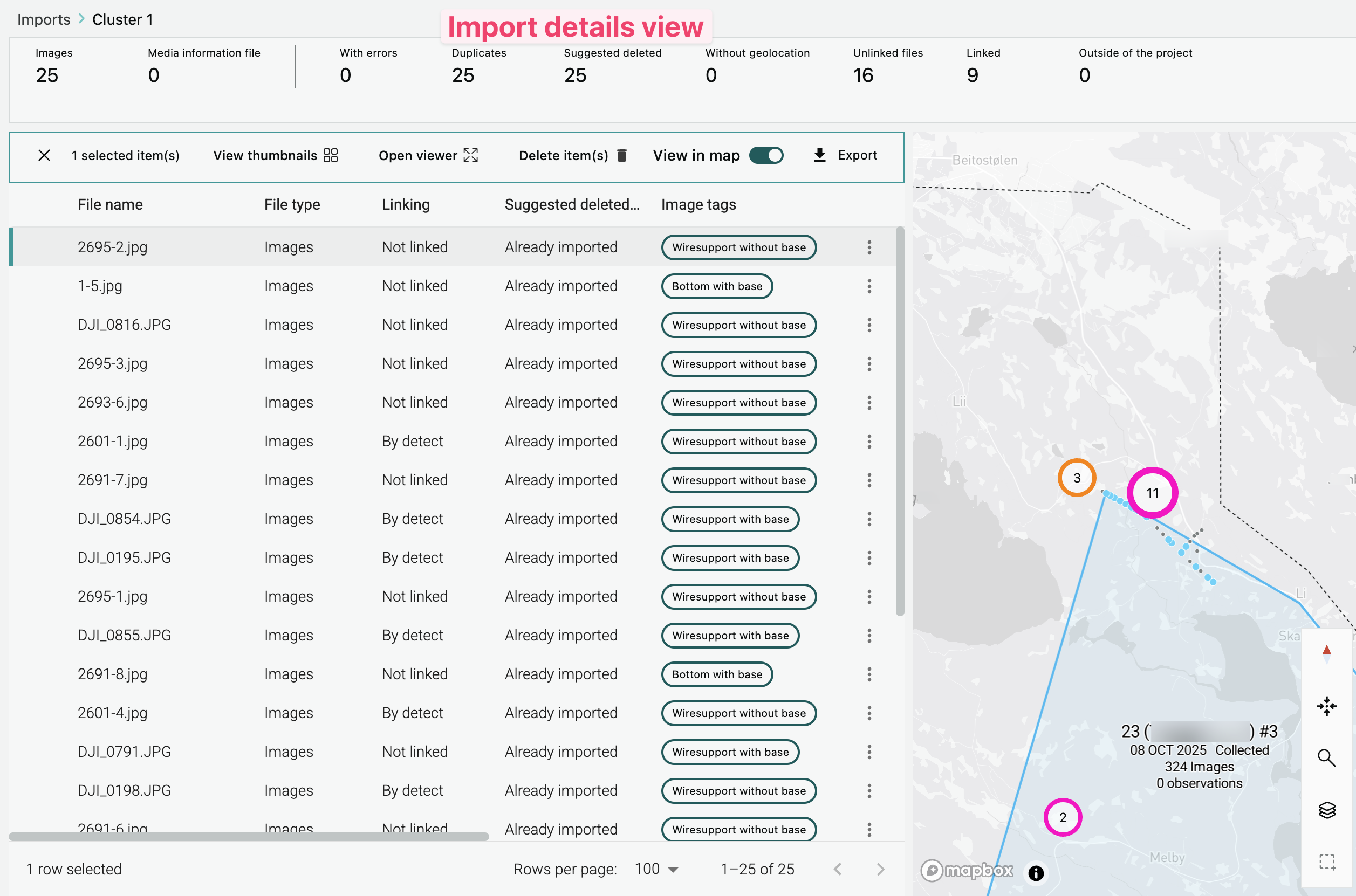
Import details are now available - some of the highlights:
- The Imports overview now shows custom name and the original folder path, as well as a direct link to see suggested Project Group based on the incoming data.
- Open any import from the overview to see all details of each file.
- AI classification of all images.
- Perform actions on each file (delete file, view image, show in map)
- Map view shows where your files are located (including polygon for point clouds) and lets you relink images to other assets if necessary.
-
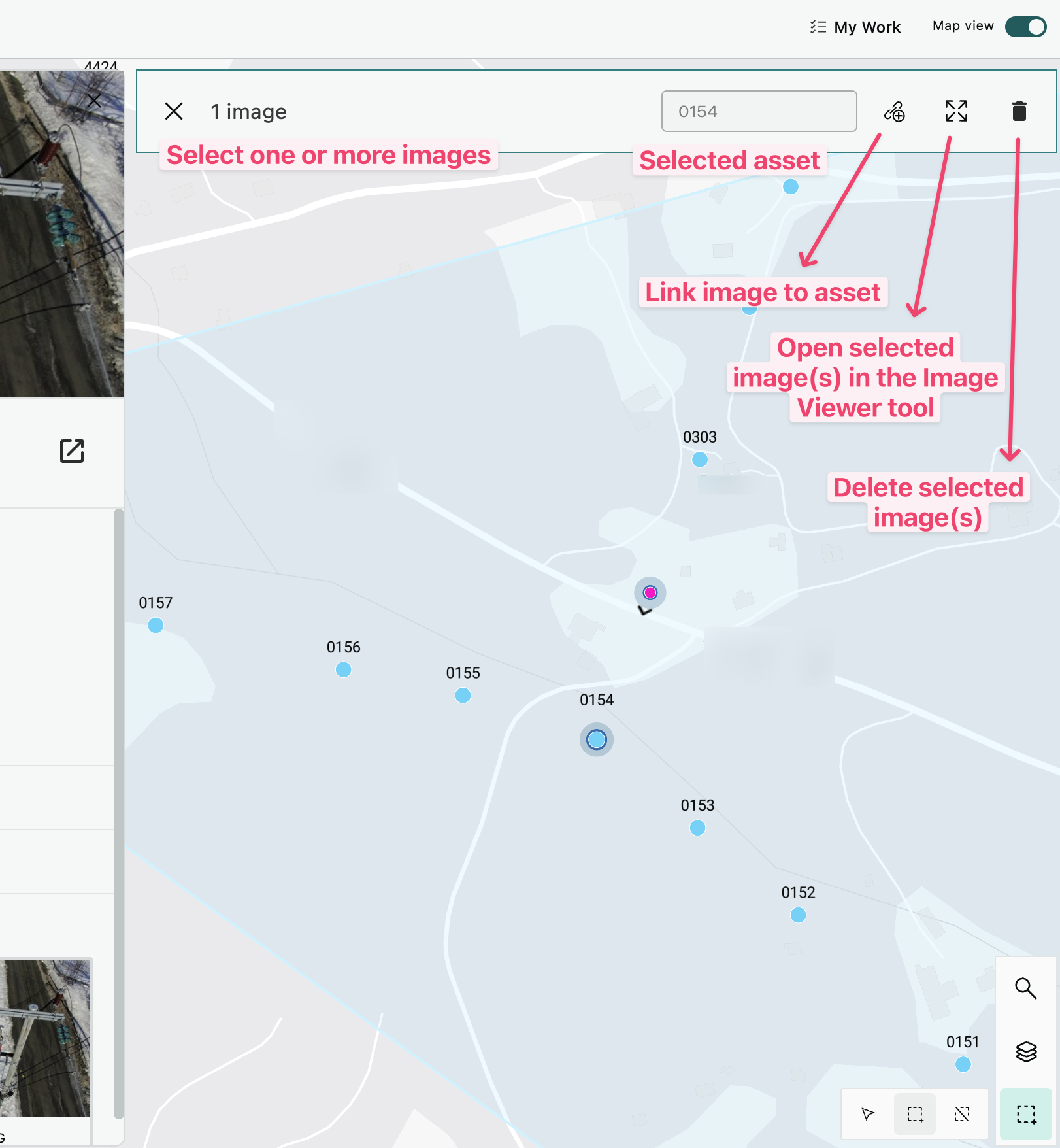
Project library map view contains many improvements:
- Visually easier to see where the uploaded data is located.
- Open image viewer for images selected in the map.
- Point clouds are shown as polygons for quick visualization.
- Simplified linking experience where you can select any image to link them to an asset.
- Delete selected images using the new map tools.
New Inspect tool capabilities
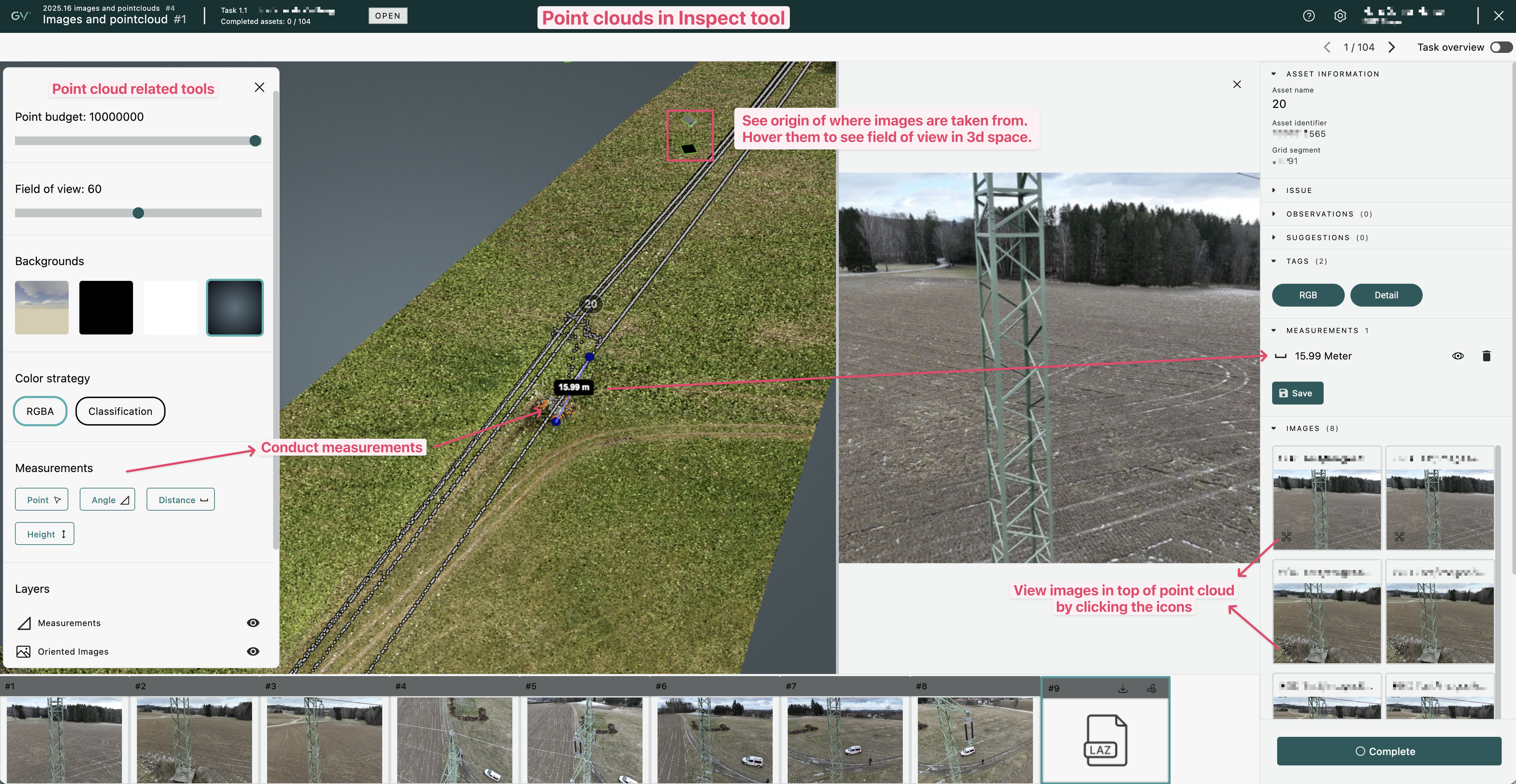
Within Inspect you are now able to see point clouds associated with the Asset you are inspecting in a split-view. The point cloud viewer lets you navigate in 3d space with a chosen color strategy.
Measurements can be conducted anywhere you like, and these can be saved for future assessments.
There is a direct connection between the point cloud and rgb images. The images can be seen directly within the 3d space, and you can also see a projection displaying the field of view.
Continuously add more files
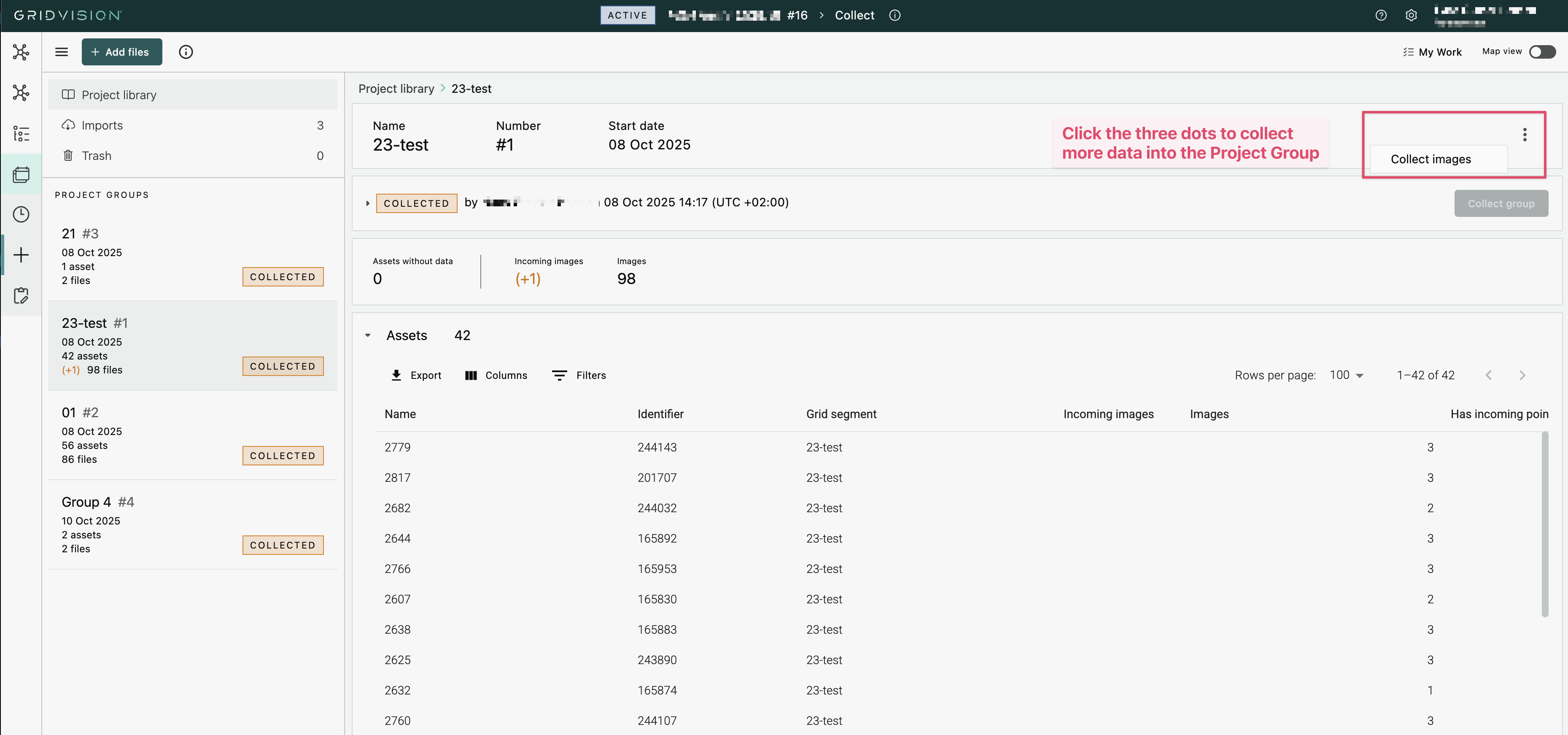
It is now possible to do the image collection after image upload as many times as you wish.
You can now upload more files into an ongoing inspection project even after the inspection work has started. This makes it possible to supplement the inspection with newly captured images without having to create a new Project.
This can be done from the Project Library in Collect after you have added more files.
Other fixes and improvements
- Asset views: Any file type associated with an asset can be viewed within Grid Vision (normal images, panoramic images, point clouds and pdf's).
- Within Work you can now quickly navigate to the Inspection Task by clicking the task number anywhere in the Project Library.
- In Verify it is now possible to complete the review of AI suggestions on a per Observation Type level, making the process more effective.
- Image cards now have a uniform look throughout the application.
- Inspection Tasks: Fixed an issue where it was possible to create multiple tasks per Project Group.
- Inspect: It is now possible to change the Observation Type of an Observation without having to make additional changes.
- Observation Viewer: In some cases the Severity was not displayed correctly.
- Grid Analytics fixes:
- Cross-filtering from the list of assets is now possible.
- When exporting Observations, the Observation Type is now included.
- Filtering based on Observation date no longer shows an error message.
- Verify fixes:
- Selecting multiple AI suggestions for validation/invalidation is now working again.
- It is now easier to select/deselect options in the available filters
2025.15.1
Release date: 2025.09.17
Another small update addressing the following:
- Collect: Fixed issue where asset and image counts were not getting updated correctly.
- Upcoming Webinar: Displaying a banner to register for our upcoming Webinar when opening the Projects module.
2025.15
Release date: 2025.09.04
This is a small maintenance release containing a few bug fixes.
- Fixed problem with opening image viewer from the project library in Work
- Fixed issue with "MUI missing licence key" sometimes appear
2025.14
Release date: 2025.08.20
Image viewer improvements
- You can now open a full size version of images from thumbnails shown in Collect and Work with our new Image viewer.
- From the map view, it is now possible to select multiple images and open them in the Image viewer, making it possible to quickly browse through all selected.
- When opening images from the Asset Home Page, the Image viewer will let you quickly navigate between all images of the same asset.
Quicker Navigation To Assets
Within the Project Manager you can now quickly go the Asset Home Page from the Project Groups and from the Asset Compact View. Simply click on the asset name to open it, or click on the asset row to see the asset position in the map.
Other fixes and improvements
- Grid filters: Fixed mis-aligned text that overlapped filter-by-value.
- Open task: Navigate directly to the inspection task from the Observation Viewer.
- Tooltips:
- Added tooltip title to all icons/buttons in Inspect.
- Fixed missing tooltip from first row in lists.
- Disabling an Observation type: We can now disable an Observation type for you, and it will no longer be possible to select when registering a new Observation.
- Grid analytics: Fixed issue with Clear filter option not available when applying crossfilter on many assets in Grid Analytics and showing of Observed By in the observation list.
- QA: Improved the loading of observations and fixed an issue with sorting on priority or severity.
- Fixed minor styling and translation issues.
2025.13.2
Release date: 2025.07.28
QA module improvements
This patch focuses on improving the QA functionality.
- Custom properties can now be updated as part of the QA workflow.
- Quicker loading and saving of data.
- Fixed some filtering issues.
Other fixes
- Tooltip improvements to enhance visibility
2025.13
Release date: 2025.07.10
Grid Analytics improvements
This release contains improvements and bug fixes related to the updated Grid Analytics module:
- KPI's: Fixed issue related to filter Assets not in an approved group.
- Observation list: Fixed translation issue for custom property headers.
- Images:
- Improved layout when viewing them on a large screen.
- Added help text shown when no image data is available.
- Fixed issue that made it impossible to collapse the image panel.
- Asset list: Fixed issue that could show assets as healthy (green) even if they had observations.
- Map view: Fixed status colouring issue for healthy assets (should be green, not grey).
2025.12
Release date: 2025.07.08
Grid Analytics improvements
This release contains improvements and bug fixes related to the updated Grid Analytics module:
- Pie and bar charts:
- Added info icons that shows help text for each of them.
- Grid segments - Asset status bar chart is now showing grid segments with most observations first.
- Improved look of pie charts by having a divider between each section.
- Map view:
- Avoid map selection to affect other tiles content until you choose to apply the filter.
- Alignment of asset health colours shown in the map vs asset mini popup.
- Asset selection: Reduced the auto-zoom level in the map when selecting an asset from the list.
- Observation list: Added help text to explain what the Crossfilter toggle does.
- Observation clusters: Added support for configuring a customer to either show Severity or Priority.
- Grid segments: Now showing the number of assets within each segment when hovering the bar chart.
2025.11
Release date: 2025.06.30
Rewamp of Grid Analytics
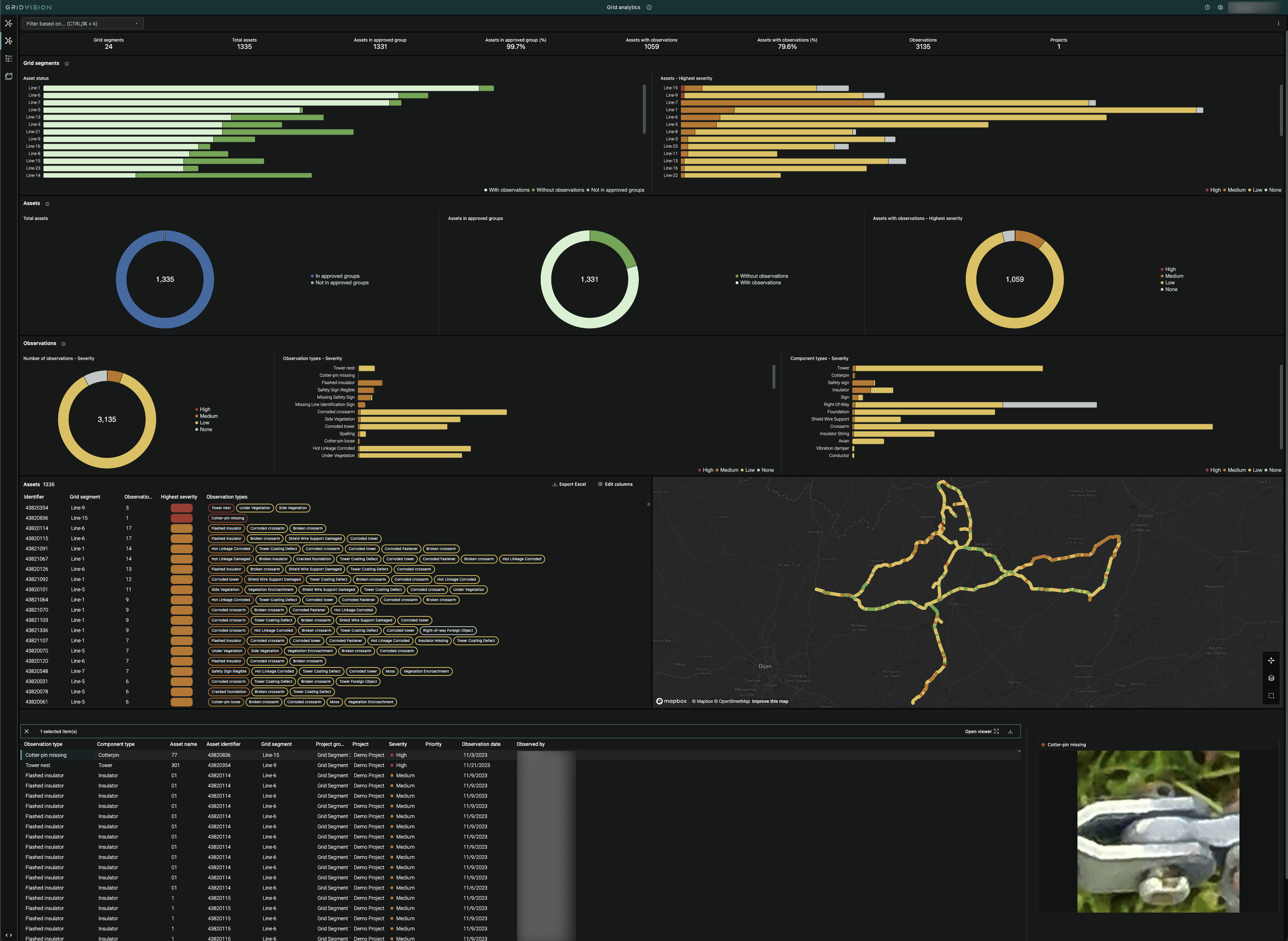
Grid Analytics has been advanced to the next level, representing a significant breakthrough in getting an overview of your data. This new version includes highly improved UX, built-in prioritization of grid segments and assets, as well as a side-by-side detailed view of all images. Identifying areas at risk will now be possible at a glance. For the first time, you will be able to see your data in multiple dimensions in the same place : geographically, over time, at different levels (grid segment, asset, observations) and connected to visual documentation. This new version will be gradually rolled out to everyone during the coming weeks.
Other improvements
- QA module:
- You can now see which observations that are potentially "AI supported".
- Tasks can now be reassigned within the QA module.
- You now get a confirmation dialogue when completing QA for a task.
- Observation Viewer: Moved the observation information to the top (above asset information).
- Project Library Observation Export:
- Fixed issue with downloading as Excel.
- Severity column was empty for all exports.
- Reassign task now automatically updates the data on screen without having to refresh the page.
2025.10
Release date: 2025.06.25
New QA module
We now introduce a dedicated workflow to conduct efficient quality assurance without accessing the task in Inspect. This will increase the quality of inspections and reduce manual labour with a vastly improved user experience!
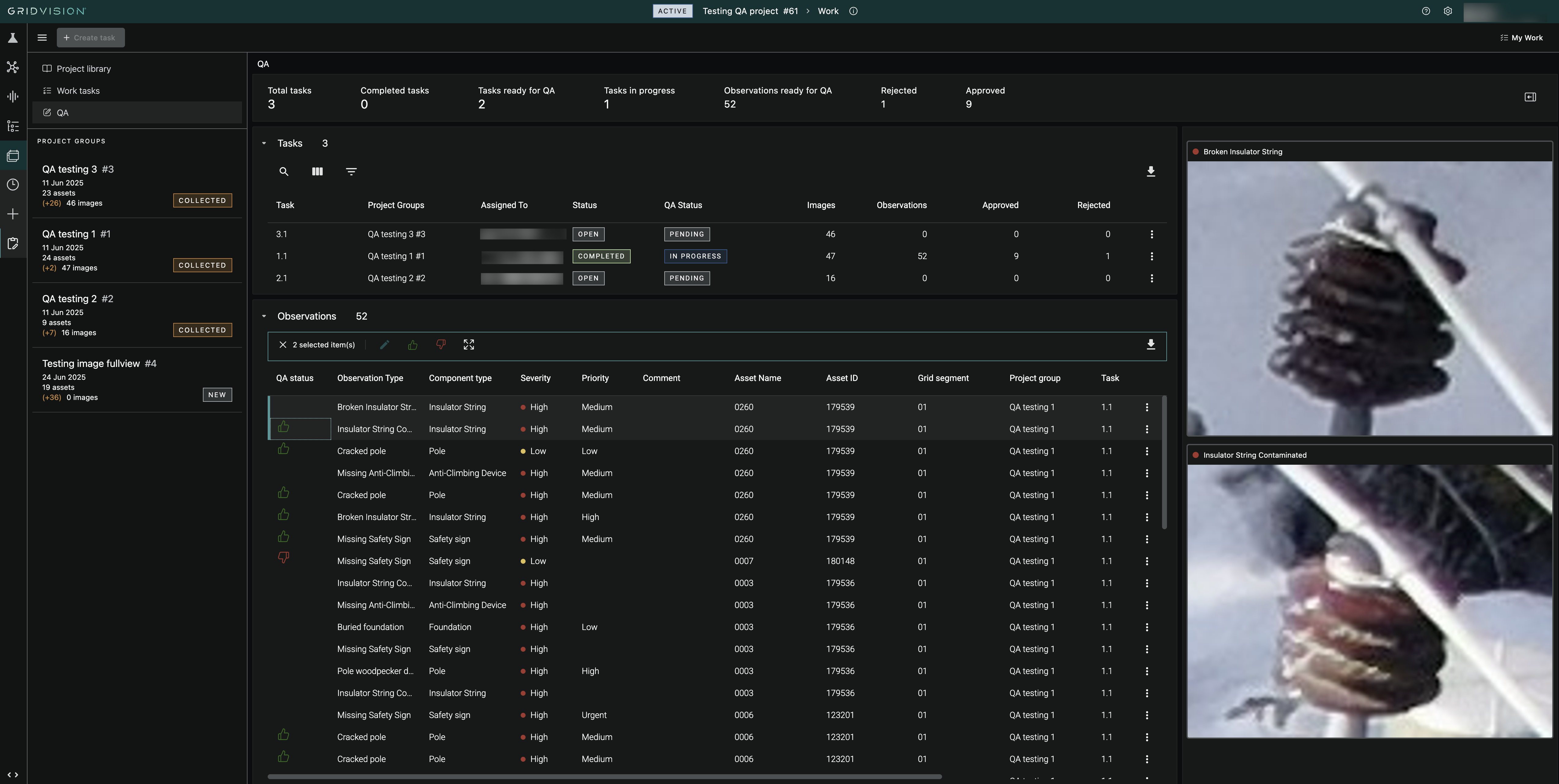
QA features include:
- Enable/disable QA when creating a task.
- Manage tasks directly in the QA view.
- Quick edit and review of observations, including keyboard shortcuts
- View image and bounding box for selected observations.
- Perform batch updates on multiple observations.
Improved and simplified navigation
- Inventory visualization is now accessible as a module (if in scope)
- Project manager has been renamed to Projects
- Grid Analytics is becoming the main module to review and query final inspection results and image based digitalised grid:
- Asset Explorer has been removed.
- Report module has been removed from Projects. Ongoing inspection results can be monitored and QAed in Work instead.
Other News in this Release
- Asset Home Page Enhancement: View images in full screen from the Asset home page for better zoom and review.
- Image navigation in asset mini pop up: Navigate through all images linked to an asset directly in the GA map.
- Improvements to the observation viewer:
- Download the observations directly from the thumbnail in the gallery view.
- Quick navigation from the gallery view to the selected observation in full view.
2025.9
Release date: 2025.06.03
What's New:
- Grid Analytics map view:
- You can now select an asset to get a mini popup with an image and the possibility to open the Asset Home Page.
- If the asset contains any Observation, you will see information about the most severe one and you get the possibility to go to the Observation Viewer.
- Inspect: It is now possible to download images and observations (including bounding boxes).
- Asset Home Page: Displaying a mini-map showing the asset location.
2025.8
Release date: 2025.05.14
Asset Home Page
The asset home page enables you to select an asset to see all asset information, when it was added to Grid Vision, which projects it has been included in, and all images and observations. In short it's a digital representation of the full history of the condition of the asset. The images with observations can be opened in full size mode to see all details and it's also possible to compare images or observations side by side. The asset home page is accessed via the observation viewer or by clicking on the asset in the map in Grid Analytics.
Fixes and Improvements
- Excel export: A direct GridVision-url to the Observation is now always included (was optional).
- Bug fixes in Inspect:
- Adjust observation: Confirm button when changing bounding-box was not enabled.
- Adjust observation: Severity field not updated when editing observation.
- Inspect image view: When having many images of an asset, the film-strip did not maintain correct scroll position for selected image.
- Inspect image view: When watching the last image of an asset, navigating to the next asset would open last instead of first image.
- Verify tool:
- Faster image loading: After validating an image, the next image will now appear more quickly.
- Layout improvement: The Not reviewed suggestions section is now displayed above Reviewed suggestions.
- Opening Verify: Was sometimes not showing any image when opening the tool.
Known issues
- CSV export: Observation direct url not included when exporting to CSV.
2025.7
Release date: 2025.05.06
Work improvements
- Open task: A task can now be opened through the new context menu available in lists of Project Groups, Observations and Assets. This makes it easier to review observations after the inspection and update them if neccessary, e.g. deleting observations or changing severity level.
- Verify AI:
- Multi select actions: It is now possible to select multiple suggestions for validation/invalidation by using shift+click or ctrl/cmd+click.
- Better understanding: You can now click the info-icon for Adaptive AI to get an explanatory help text.
- Filters and sorting: Added threshold filters and sort order options for suggestions.
- Localization: Changing to another language no longer causes an error message.
- Link sharing: It is now possible to share the link to this tool.
Other fixes and improvements
- Update observation: You can now update the bounding box of an existing observation.
- Delete observation: You now get correct feedback after removing an observation.
- Inspect: Improved handling of cases where there are multiple observations on the same image with overlapping bounding boxes.
- Observation lists (everywhere): Fixed issue with filtering on observation score.
- Observation lists (work): Fixed issue with wrong item count being shown.
2025.6
Release date: 2025.04.02
What's New:
- Automation: Get notified when essential components are missing from power line structures.
- Improved Views: Enhanced asset views, filter retention, and project group indicators.
- Asset List: Avoid endless scrolling and updated severity/priority coloring.
- Filters: Grid Analytics now remembers your applied filters.
- Project Groups: Updated processing job indicators.
- Observation Viewer: Display all observations and auto-zoom automatically.
- Verify AI: Fixed issues with inspected suggestions.
- Inspection Enhancements: More intuitive and efficient inspection experience.
2025.5
Release date: 2025.03.24
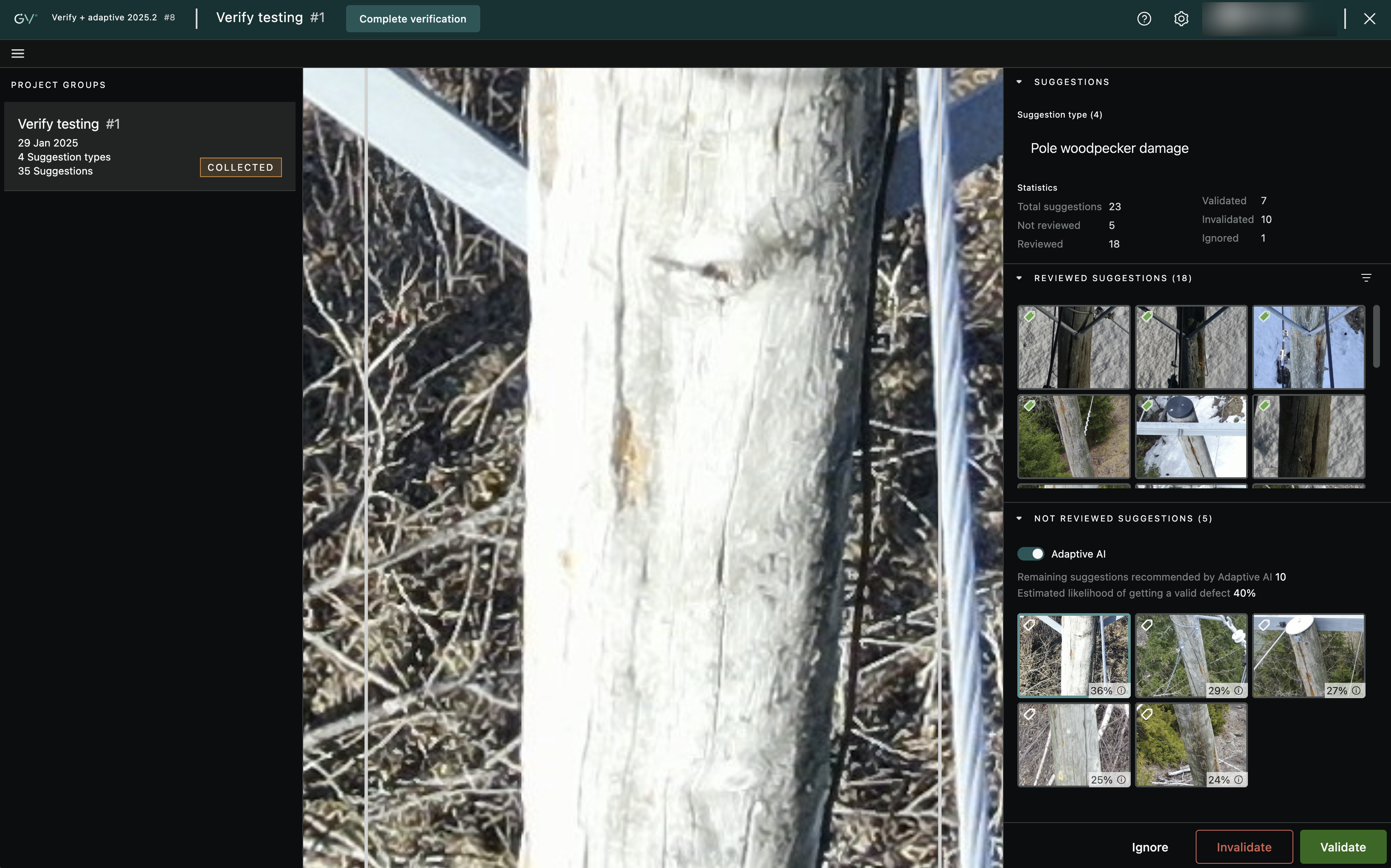
Verify & Adaptive AI Launched
Introducing Verify – the revolutionary tool designed to streamline your AI suggestion review process! Unlike the traditional asset-by-asset review in Inspect, Verify allows you to review suggestions per observation type across all assets, making your workflow more efficient and effective. Through our ground breaking Adaptive AI the review results gets re-used in your future Inspections. This leads to quicker Inspections with better quality AI results.
Key Features:
- Enhanced Speed: Accelerate your review process by quickly evaluating AI suggestions before diving into asset reviews in Inspect.
- Optional Step: While recommended, using Verify before Inspect is optional, giving you flexibility in your workflow.
- Confidence-Based Suggestions: For models without Adaptive AI, suggestions are presented in order of AI confidence score, ensuring you focus on the most relevant insights.
- Adaptive AI Synergy: Combine Verify with Adaptive AI to teach the system your preferences, drastically reducing false positives and enhancing accuracy.
- Project Group Integration: Easily access Verify through the project library in Work, organized by Project Groups.
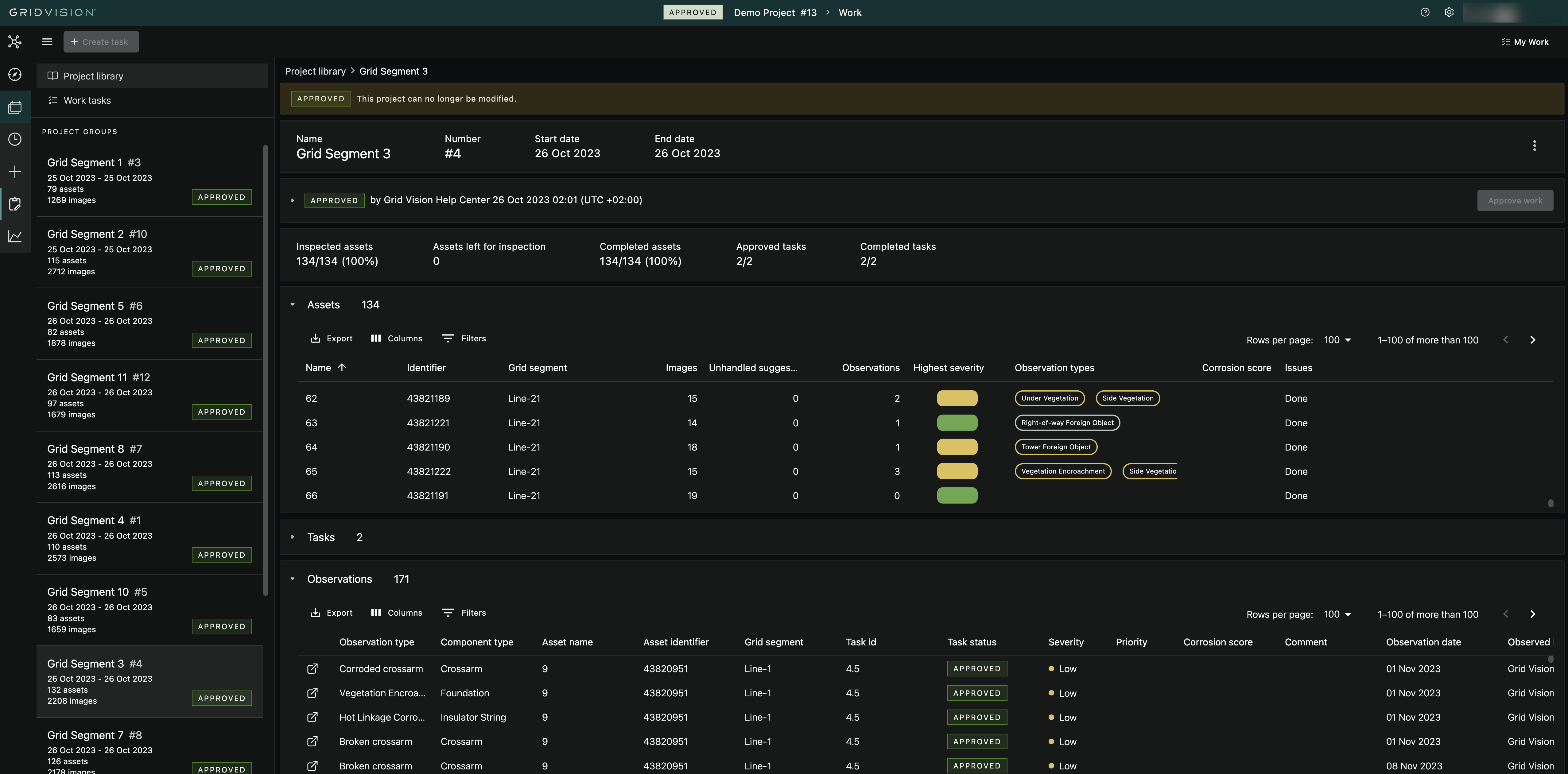
Get a better Overview in our Updated Work Module
The Work Module has been extended to display an overview of all Observations, making it easier to get an overview of the results from ongoing Inspection Tasks.
- Asset state: The asset list now has a new column for highest severity/priority to easily assess the inspection state of an asset
- Colour coded for high visibility.
- Observation summary shown in a separate column.
- Added Observation list to Project, Project Group and Asset Pages: will show both completed and approved observations!
- Observation list contains all relevant properties, also custom ones.
- Lat/long properties are also available (relevant when exporting the data).
- Corrosion score is also available (where applicable).
- Possibility to sort on assets with highest severity or priority.
- Added KPI sections in Project, Project Group and Task pages.
- Asset List: Added inspection issues, lat/long and total corrosions score.
Enhance Your Inspection Workflow with Our Latest Updates
Experience a more efficient and user-friendly inspection process with our latest improvements in the Inspect tool:
- Bounding Box Colours: Fixed issue where colours were not correctly applied based on Priority or Severity.
- Split Screen Toolbox: Resolved issue with toolbox visibility in split screen mode.
- Overlay Adjustments: Improved overlay to ensure the image info icon is accessible for Approved groups.
- Filmstrip Sorting: Images in the filmstrip are now sorted by capture time for easier navigation.
- Navigation Bug Fix: Resolved issue causing unwanted auto-scrolling when moving to the next image.
- Observation Types: Recently and Frequently used Observation Types now update accurately based on user activity.
- Map Rotation in Inspect: You can now rotate the map in split screen while using Inspect by holding CTRL+Left Mouse button while moving your mouse.
- Zoom Persistence: Zoom level is retained when navigating between assets.
- Complete Button Update: After inspecting an asset, the action button now reads Complete instead of displaying the asset name.
Grid Analytics Enhancements
Enhanced Filtering and Navigation:
- Fixed GA Clusters Issue: Improved map filtering for seamless data analysis.
- Observation Viewer:
- Effortlessly navigate through observations.
- View all observations in a convenient gallery mode.
Export and Data Accuracy:
- Excel Export: Simplified data export for better reporting.
- Fixed Display Issues: Ensured accurate display of 'Observed by' information.
- Complete Data Export: Included missing Asset Identifier and 'Observed By' details in exports.
User Interaction:
- Updated Multi-Select: Multi-select now requires ctrl-click, preventing accidental selections.
General Bugfixes
- Work: Fixed bug with showing wrong icon in image gallery
- Create Group and Collect Complete: Updating image and asset counts more quickly
- Maps Fixed issue with disappearing data in the map when switching between dark/light/satellite modes
Known issues
- Work:
- When creating a new Task it does not appear automatically, you have to refresh the page to see it.
- When re-assigning a user to a Task you get no visual feedback.
- Inspect: When deleting an observation, you erroneously get a message that the operation has failed (but it is deleted as requested).
- Grid views: Not storing column width
2025.4
Release date: 2025.02.28
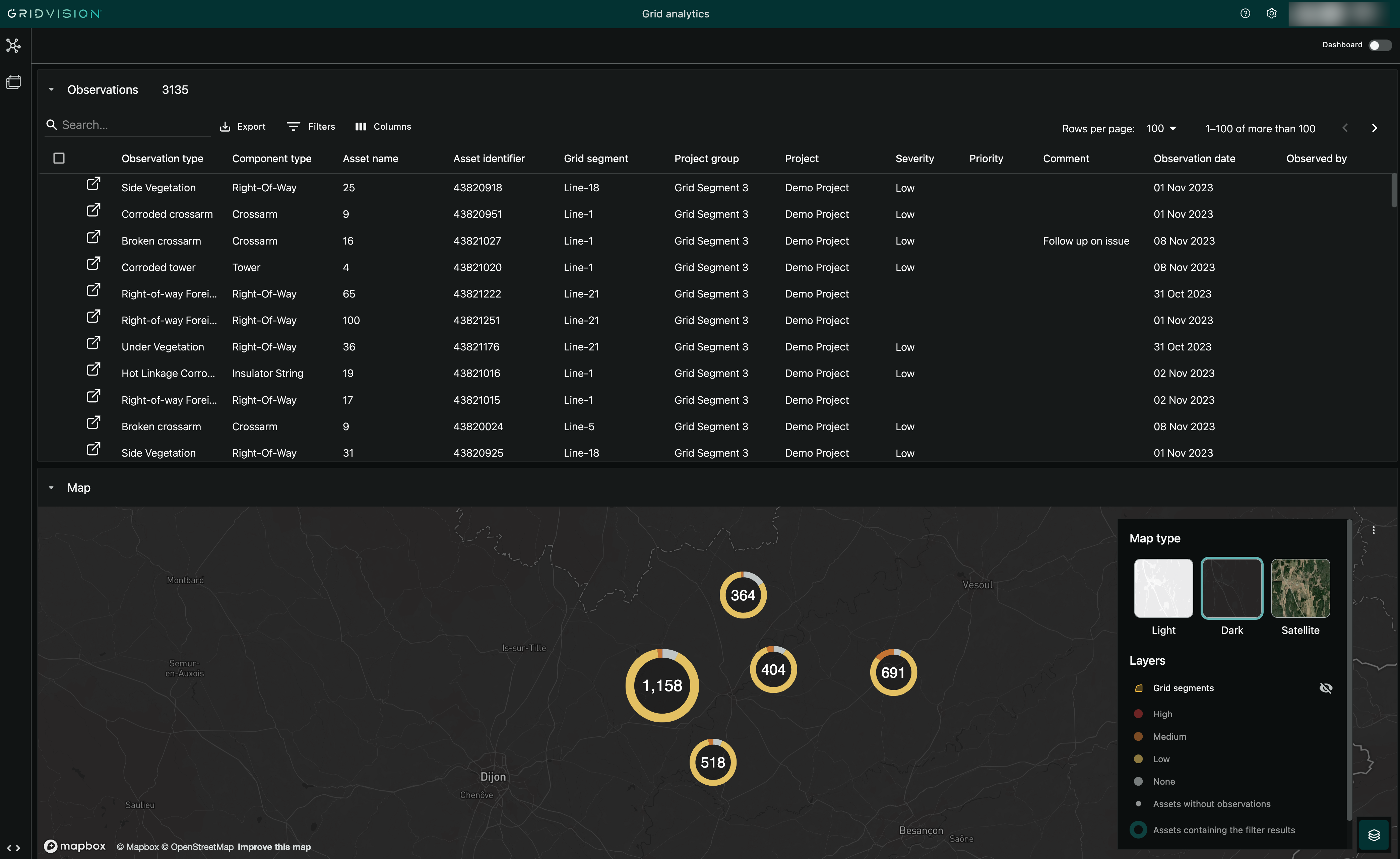
Grid Analytics Module Launched
Make faster, data-driven decisions with an aggregated view of all asset and condition data across projects and dimensions.
Note: This module will be enabled user by user based on their needs.
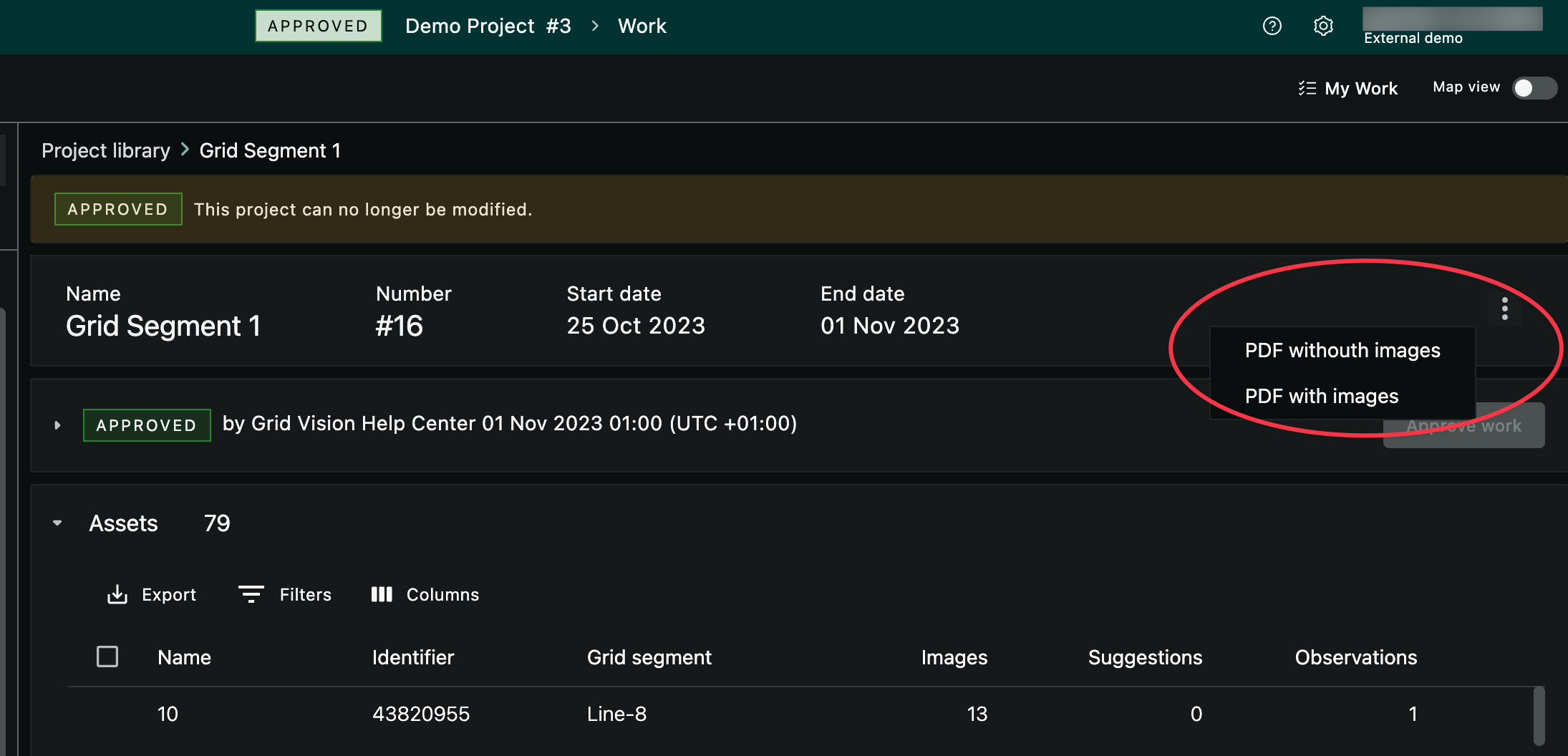
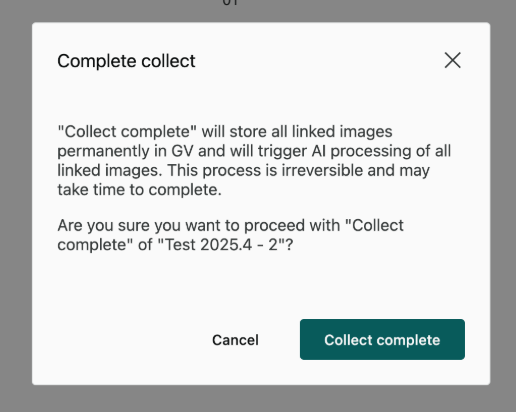
PDF Reports for Project Groups is Now Available
See and share the results of an inspection in a handy PDF format, delivered by email directly to your inbox.
- Get a summary of the inspection.
- See detailed information about all observations for each asset.
- See images with bounding boxes of all observations (optional).
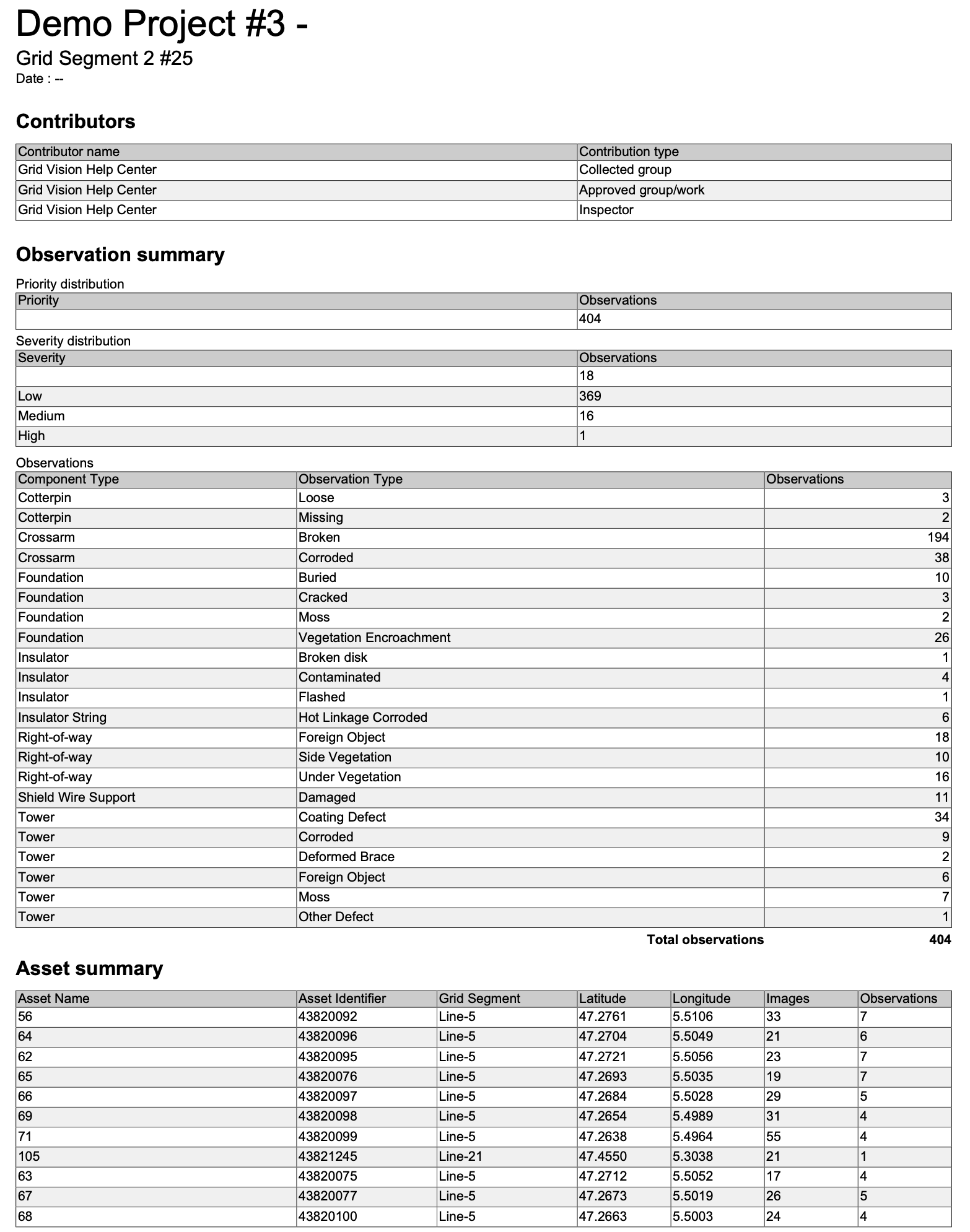
Faster inspection planning with grid segment grouping
When planning which assets to inspect and add to a Project Group, it is now easier to use the map tool to find and select whole Grid Segments.
- Better hover effect on the Grid Segment to see that it is clickable.
- Grid Segments are now shown on all zoom levels.
- When there are overlapping Grid Segments, you now get a context menu with details about each and the possibility to select one of them.
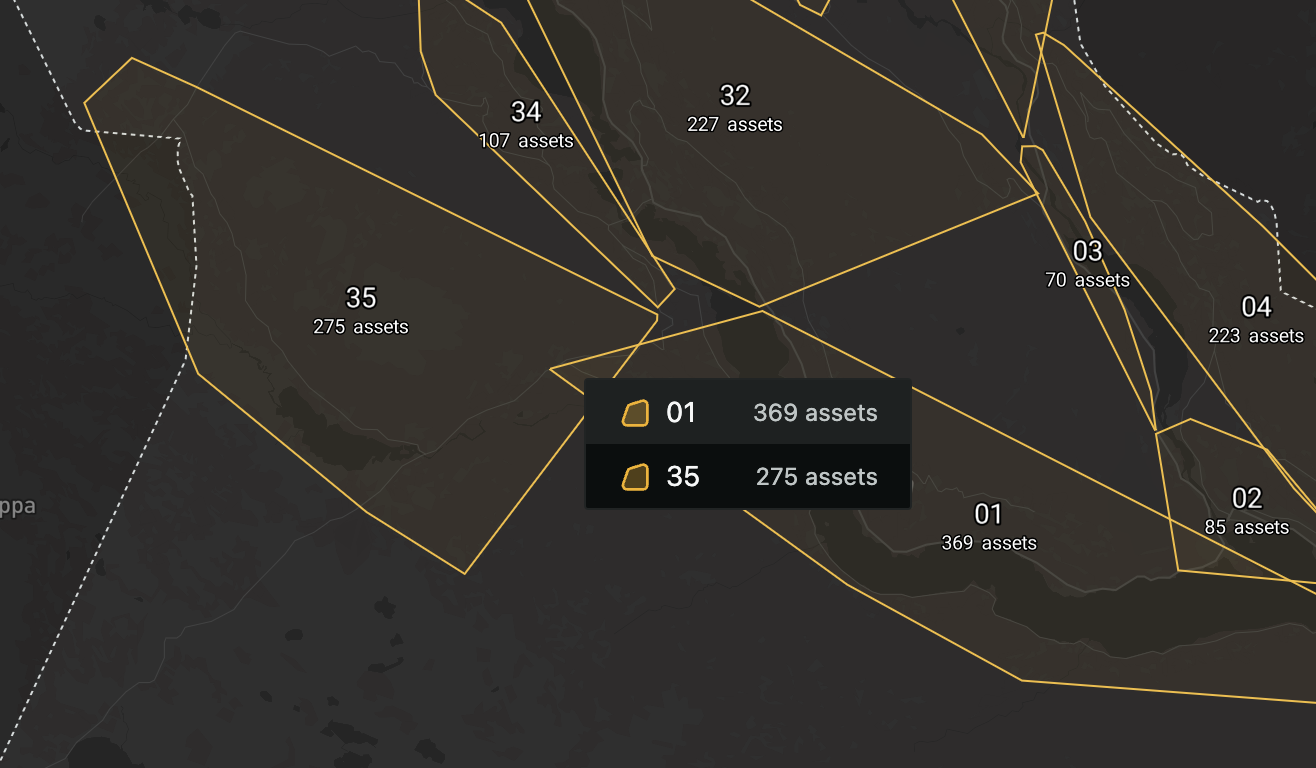
Confirmation Dialogues for better Guidance
When performing certain actions that are irreversible you now get a confirmation dialogue with more information and guidance.
- For Complete collect and Approve work you now get information about what will happen next and that you cannot go back to make changes.
- Ensuring confirmation so no decisions are done with out double checking.
Bug fixes and improvements
- Image viewing:
- Improved stability of image loading: In some cases the user had to refresh the page to load all images properly, this is now improved.
- Faster loading of images in gallery views: We have optimized the image size and quality to display various thumbnail sized images quicker.
- Observation viewer: Fixed a bug that prevented details from showing if the observation was created by a now deleted user.
- Data upload: When uploading new images to a project, the numbers showing incoming images are now updated within a few minutes instead of hours.
2025.3
Release date: 2025.02.14
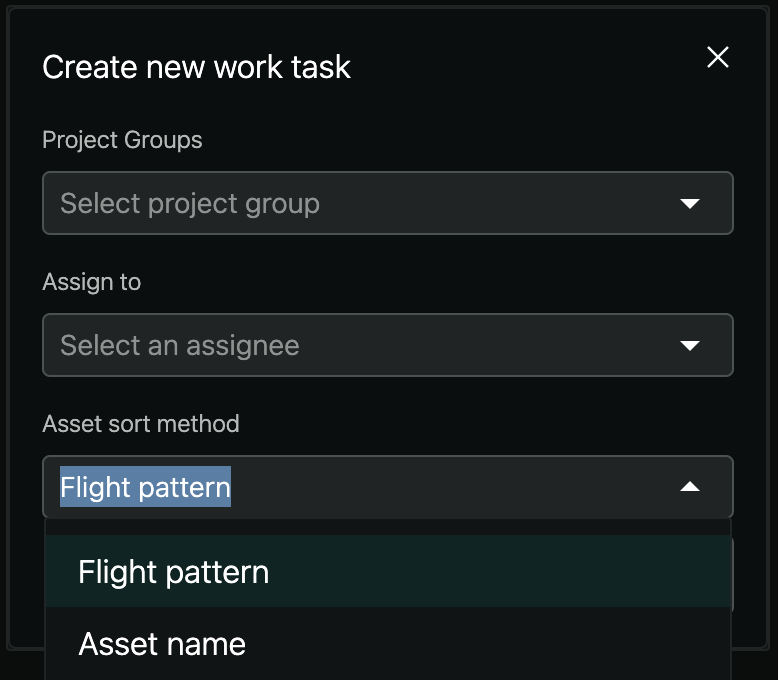
Customisable Asset Inspection Sort Order Now Available
Boost your asset inspection workflow with the ability to customise the sort order, providing more relevant and organised data.
- Choose to sort by asset name (previous method) or flight pattern (new option)
- Inspection order is now based on the image capture timestamp, offering improved task organisation
Zoom Beyond 100% for Greater Asset Detail
Gain greater detail with the ability to zoom deeper than 100% in the image viewer, providing enhanced clarity for inspections.
- Zoom in beyond 100% for a more detailed view of images
- Improve accuracy in inspections by examining finer details
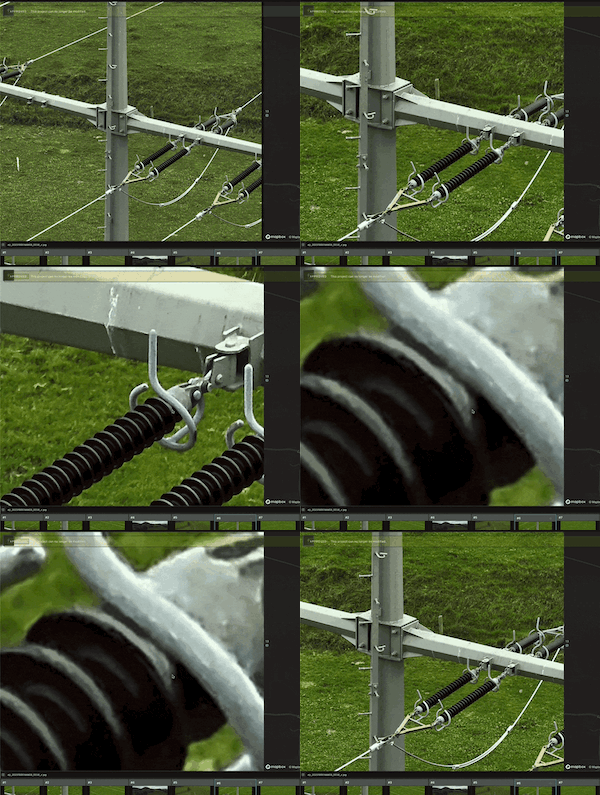
Filter on most frequently used Observation Types for quicker inspections
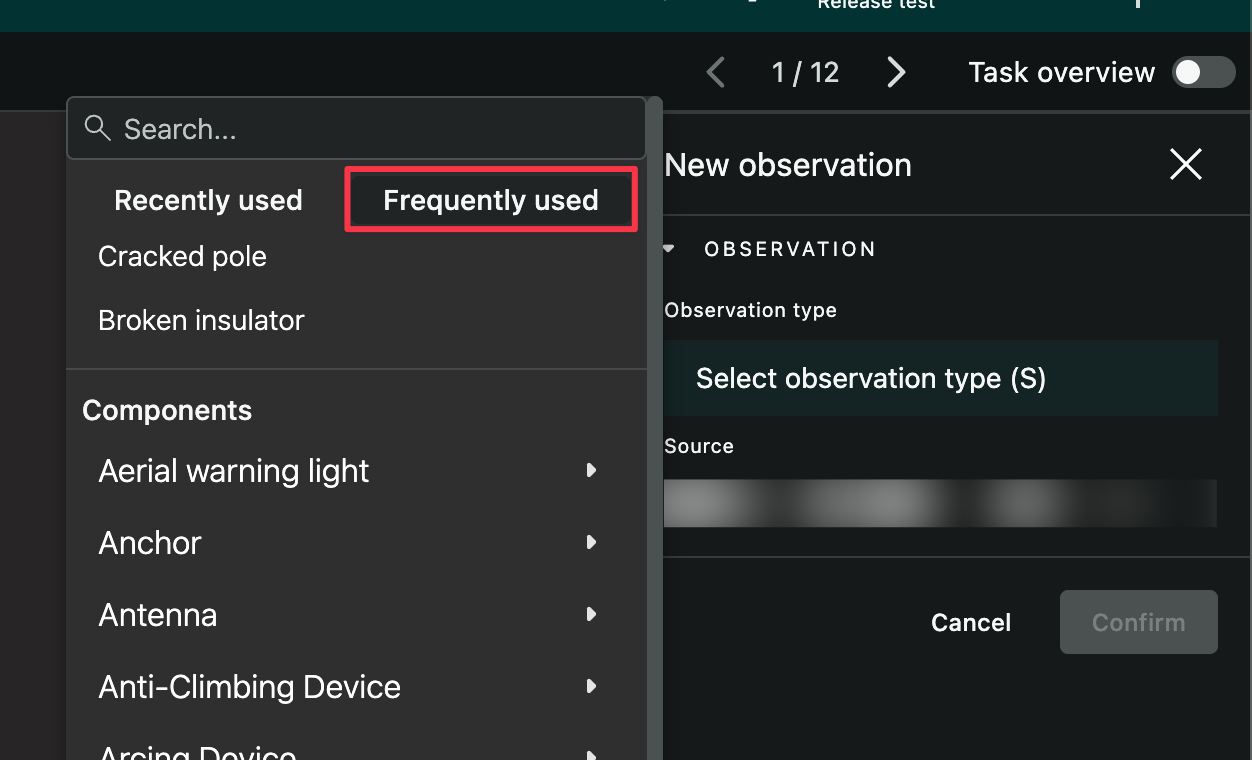
Increase inspection efficiency with the ability to quickly access most frequently used observations types in addition to recently used ones.
-
Within the inspect tool, when selecting an observation type you now have a new filter to show most frequently used observation types
-
Bug fixes
- Inspect tool fixes:
- When selecting an observation type, the Recently used filter could sometimes show incorrect types
- Wrongly asking about unsaved changes when opening an Observation and then closing it again (even if no changes were made)
- At certain zoom-levels, the mini-map was wrongly displaying a lot of lines between assets and images
- When making adjustments to an existing observations, the texts for Severity and Priority was not updated correctly (making them show up with the wrong text in the Report module)
- Column selector: Fixed an issue where turning columns on and off in data grids caused the column selector to reopen automatically the next time a page with grids was loaded
- Close Inspect tool: Resolved a problem where the "X" button in the upper right corner would not close the Inspect tool when opening a task from My Work
- Map view in Report: In the Report module the map view would sometimes lead to a full screen error message
- Duplicate data in grids: For data migrated from old Grid Vision, some grid views were showing duplicated data on multiple lines
- User Guide Search: In the User Guide it was not possible to navigate to links from the search results
2025.2
Release date: 2025.01.31
Improvements
- Improved loading times within the Project Manager
- In the Observation viewer, the bounding box fill has been removed for better visibility
- When using the satellite view on maps, we now also show locations and road names
Bug fixes
- Display of asset and image count in project groups had long waiting times and sometimes showed an infinite loading symbol
- Observed by and observed at columns now shows matching information (from latest modified)
2025.1
Release date: 2025.01.15
Improvements
- Performance optimisations in loading project groups
- Several minor UI updates
- Show all assets in Report map, and not only the ones with observations
Bug fixes
- Fixed sorting in Inspect overview and Asset inspection view, also correct order generated when creating task
- Fix for asset identifier filter in Asset list views
- Thermal images no longer classified as "Suggested deleted"
- Fixed severity colouring in observations lists vs report dashboard (v2025.1.1)