- Deutsch: Diese Seite ist nicht ins Deutsche übersetzt
Release Notes
Release notes outline the changes and updates introduced in each version of the application.
2024.20.3
Release date: 2024.12.06
Bug fixes
- In the Dashboard inside the Report module:
- Corrected display of KPI's
- Improved performance of data fetching
- Fixed a timezone issue preventing the creation of new projects when the local date was different than UTC date (2024.20.3b)
- Fixed missing German translations in Report module and PDF's (2024.20.3c)
- Added image capture date for each observation to PDF's (2024.20.3c)
2024.20.2
Release date: 2024.12.05
Bug fixes
- Inspect tool was only displaying the first 20 images per asset
- In certain scenarios, the Report module crashed when being opened when containing migrated data
- Clicking the dashboard labels in the Report module did not apply correct category filters
2024.20
Release date: 2024.11.29
New features
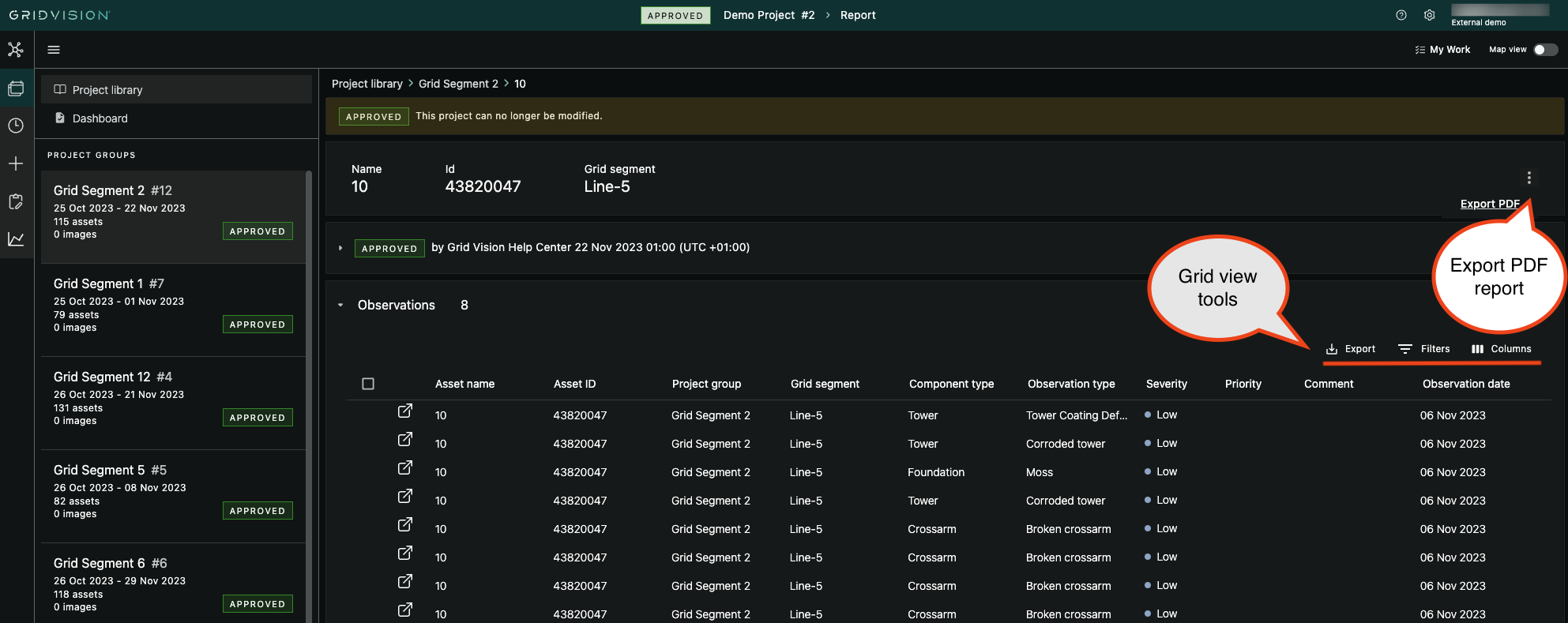
- Added possibility to get a PDF report of inspected assets in the Report module. This is available for the approved groups-
- Reassign task - it´s possible to reassign open and completed tasks to a different user
-
Introduced the new grid view inside project library in the Work module
- Includes the possibility to sort, filter, select columns and export data to csv
Bug fixes
- Inspection order of assets did not follow a natural sort order
- Fixed a navigation issue when having an asset with no images in the Inspect tool
- Fixed a page-not-found issue opening certain inspection data migrated from old Grid Vision
- Bounding box from previous suggestion was appearing when navigating to the next asset in the Inspect tool
- Fixed problem with map view toggle in Report not always working as expected
2024.19
Release date: 2024.11.26
This release contains multiple new features along with bug fixes and stability improvements.
Work
-
In the Inspect tool
- Added split screen view for showing image and map side by side
- This can be toggled by clicking the left side icon between the image viewer and the image filmstrip
- It is now possible to re-link images to another asset in this view
- Some restrictions apply depending on the status and if the target asset is completed or approved
- Navigation between assets during the inspection is now a lot quicker
- Properties related to Observation registration and display have gotten an overhaul
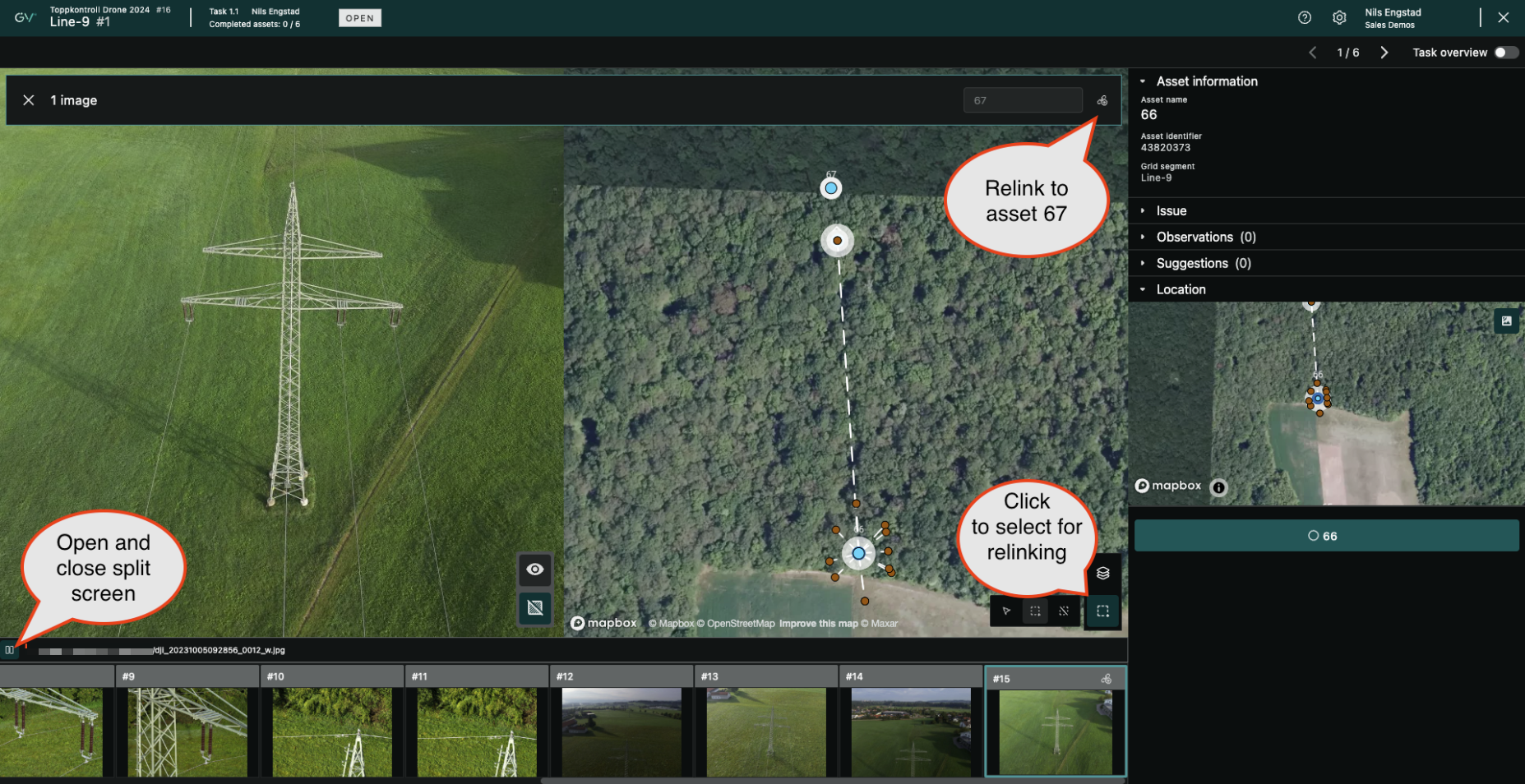
- Added split screen view for showing image and map side by side
Report
- New grid view to display Project Groups, Assets and Observations
- Possibility to add filters
- Possibility to select which columns to display
- Possibility to export data to a csv-file (all or a selection of items)
- For Observations: The csv file includes a link to open the observation in Grid Vision
- You can now review observations across Project Groups in addition to individual Project Groups
- Observations can be opened from the grid view to see more details
- You can view observations in the map view
- Zoom in to see single assets with severity-colour of worst finding
- In the Dashboard view:
- You can select to display data either for Severity or Priority (availability depends on customer configuration)
- Click on an item for further filtering. Click it once more to revert
- See legend that explains what the colours mean in the diagrams, tables and maps
Bug fixes
- Image count on assets will now be updated when re-linking in Collect
- Fetching configured observation type schema correctly when registering new Observations
2024.18
Release date: 2024.10.10
- Added possibility to see both incoming and processed images in the Project library and Asset explorer
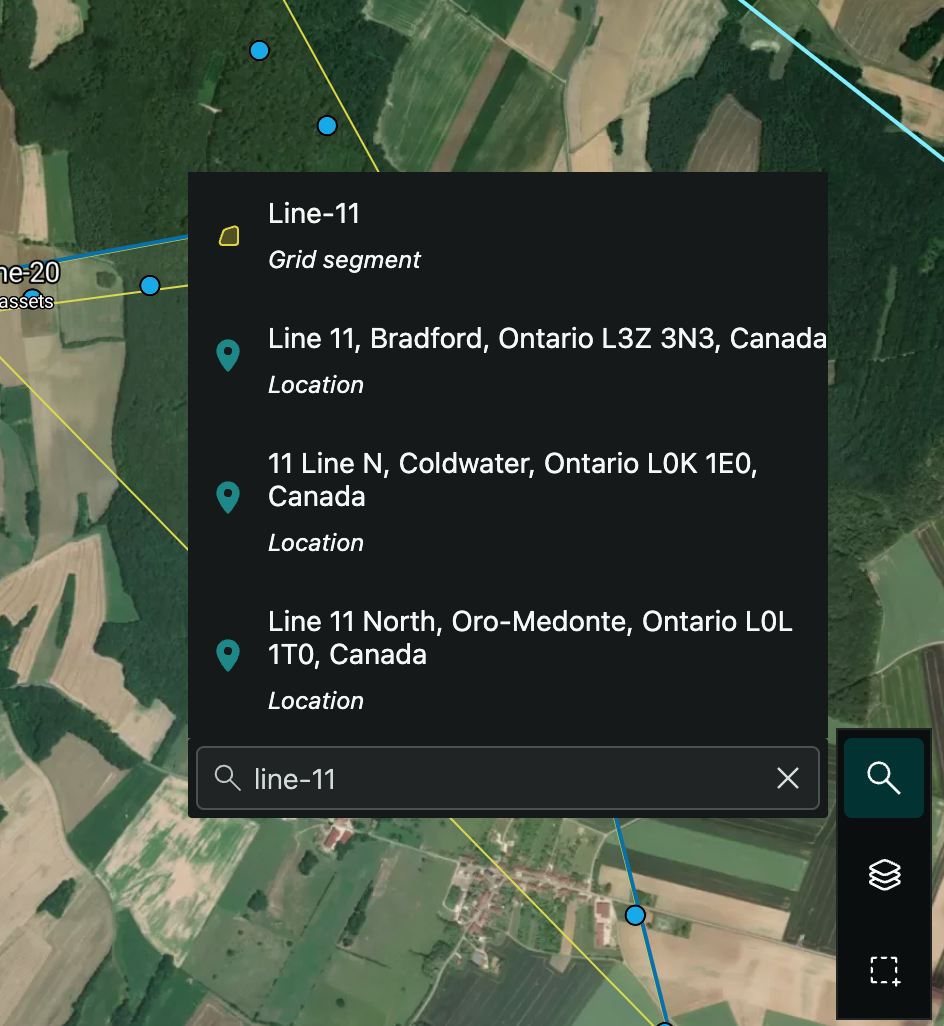
- In the Project manager, a search tool has been added to the map view
- It is possible to search for asset name, identifier, and grid segment
- It is also possible to search for geographical locations
- Clicking on the result navigates you to the item
- User experience improvements on Project details page in Plan
- Made it possible to delete incoming images from the Project library
- Fixed a problem where it was not possible to create a project group from a suggested group in Plan (2024.18.3)
- Fixed an issue where the image filmstrip in the Inspect tool did not work correctly if having more than 20 images of one asset (2024.18.4)
- Fixed rendering issue for some custom observation type properties (2024.18.8)
- Stabilized behaviour for deleted images in map view (2024.18.8)
- Minor bug fixes (all releases)
Example of search in map:
2024.17
Release date: 2024.09.25
- Added step to set a task to "Completed" before the Project Group can be "Approved"
- Added possibility to mark assets as completed from the asset overview page within a task
- Made it easier to see assets in the map view
- Added visual indicators to make it easier to navigate in menus
- Improved loading times of the inspection tool
- Various bug fixes
2024.16
Release date: 2024.09.04
- Added "My Work" to easily find your assigned tasks
- Made it easier to see the progress of a task
- Added possibility to change between dark and light map backgrounds, independent of selected theme
- Added progress indicator to the "Collect complete" processing step
- Added possibility to copy texts
- Design adjustments
- Minor bug fixes
2024.14
Release date: 2024.08.28
- Added support for custom Observation Type Properties
2024.13
Release date: 2024.08.26
- Initial release of new Grid Vision